Live in Action
See how Kenny looks in your Discord server
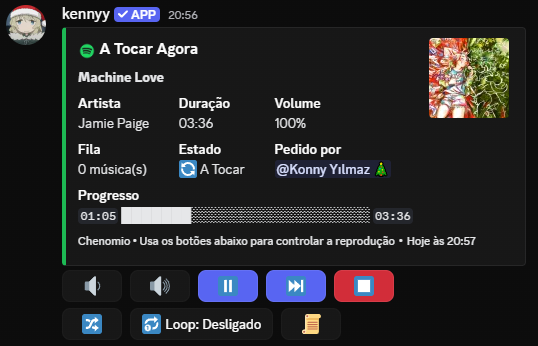
Kenny offers high-quality music streaming with multi-source support, advanced controls and seamless experience.
Everything you need for the best music experience
Support for YouTube, Spotify, SoundCloud and more. Access millions of songs from different platforms.
Type the song name and let Kenny find it for you. Fast and accurate search.
Customize the sound with filters like bass boost, nightcore, vaporwave and much more.
Add, remove, shuffle and organize your songs with ease.
Repeat a specific song or the entire queue. You have the control.
Support for Portuguese, English, Spanish, French, Italian, Japanese, Russian and Turkish.
High-quality streaming without lag or interruptions. Powered by Lavalink.
View the lyrics of your favorite songs while they play.
Simple and powerful commands to control your music
/play
Plays a song or playlist
/pause
Pauses the current song
/resume
Resumes playback
/stop
Stops the music and clears queue
/queue
Shows the music queue
/skip
Skips to the next song
/skipto
Skips to a specific position
/shuffle
Shuffles the queue
/filters
Applies audio filters
/seek
Forward/rewind in the song
/lyrics
Shows the song lyrics
/language
Changes the bot language
See how Kenny looks in your Discord server
Kenny was created to offer the best music experience on Discord. With cutting-edge technology, multi-source support and intuitive controls, transform your server into a true music party.
Developed with Node.js and JavaScript, using the best libraries available, Kenny guarantees exceptional performance and unmatched stability.
const player = await kazagumo.createPlayer({
  guildId: interaction.guildId,
  textId: interaction.channelId,
  voiceId: voiceChannel.id
});

await player.play(track);